
jetAudio+ Hi-Res Music Player
Team JetMusic & Audio
4.22.45K Reviews
- Version
- 13.1.0
- Installs
- 100.00K
- Age Rating
- Everyone
Screenshots

Our Review of jetAudio+ Hi-Res Music Player
 Analysis by Appyee
When I want a music player that lets me shape the sound rather than simply press play, jetAudio+ Hi-Res Music Player is the kind of app I consider. It is an Android music and audio app from Team Jet, built around local listening, sound controls, and network or cloud streaming. I find its appeal clearest when I already have music I want to hear and would rather adjust playback myself than rely on a service’s recommendations.
The app has a 4.2 average from around 24,000 ratings, and it has passed 100,000 installs. That gives a useful sense of its established audience, though it does not tell me whether its hands-on approach will suit you. The important choice is how much control you actually want: jetAudio+ rewards a listener who enjoys tuning settings, but it can feel like more app than someone needs for a quick, uncomplicated play queue.
A practical routine for everyday listening
I’d start by treating it as a home for music I already have, then build a routine around how I listen. For a commute, that might mean preparing a playlist before leaving, choosing a comfortable sound profile, and using the lock-screen controls for skips and pauses. At home, I can spend more time adjusting the equalizer or effects. Keeping those two habits distinct helps me avoid fiddling with sound settings every time I switch from headphones to speakers.
That distinction matters because equalization is not a universal improvement button. A bass-heavy setting that makes a quiet walk more enjoyable might muddy a podcast or a vocal-led track. I’d make modest changes, listen to familiar songs, and keep a neutral option in mind so I can tell whether a tweak is helping rather than simply making everything louder or more dramatic.
Settings worth approaching with care
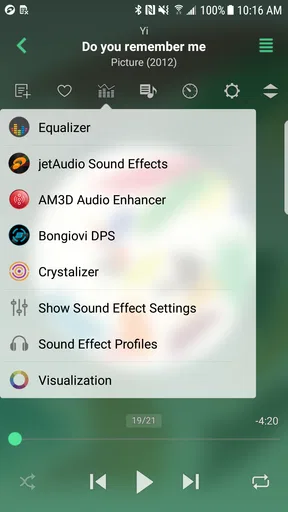
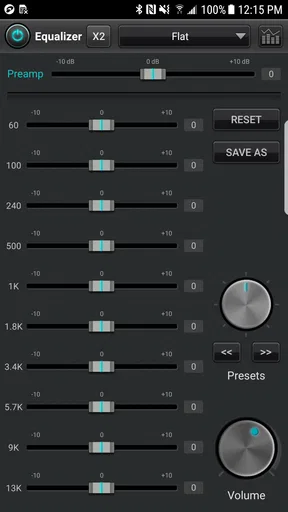
The graphic equalizer is one of the most useful reasons to choose this player, especially if your headphones make some parts of a mix sound too sharp or thin. I would adjust a few bands at a time and compare the same passage, rather than changing the whole curve at once. That makes it easier to reverse a setting that improves one album but makes another less natural.
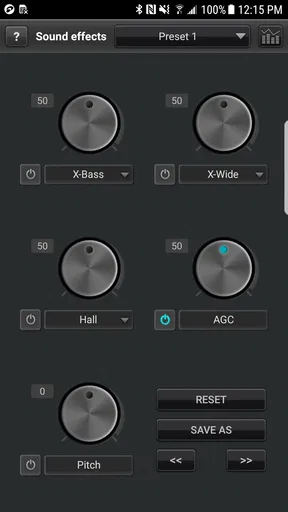
Sound effects such as AM3D Audio Enhancer and Bongiovi DPS offer another layer of adjustment. They can be enjoyable when a recording sounds flat to me, but effects are taste-dependent, and piling processing on top of a strongly adjusted equalizer can make the result tiring. My practical rule is to change one thing, listen for a while, and only keep it if it works across more than one track.
Crossfade and gapless playback serve different listening habits. Gapless playback is the setting I’d look for when an album’s tracks are meant to flow together; crossfade is more useful when I want a continuous mix between separate songs. The sleep timer also suits a repeatable bedtime routine: I can listen without needing to remember to stop playback myself.
Shortcuts, playlists, and repeatable habits
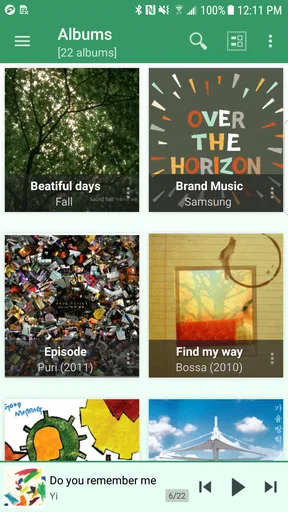
Widgets and lock-screen controls can make the app feel quicker once I settle on a regular setup. I’d place a widget where I can reach it easily, then use the lock screen for simple controls while walking or commuting. Those conveniences matter most when I’m already listening; they do not replace the initial work of organizing a library or deciding what to play.
Playlist importing can ease a move from another player, but I would still check the results before relying on a long playlist. A sensible transition is to import a few familiar collections first, confirm that their order looks right, and then bring over the rest. For a daily routine, I also like keeping separate playlists for different situations rather than trying to make one collection work for exercise, quiet evenings, and background listening.
Where it fits—and where it may not
Compared with a streaming app that centers discovery, recommendations, and a ready-made catalog, jetAudio+ makes more sense to me as a playback tool for a personal collection, with streaming options also part of its feature set. If my main goal is to find unfamiliar artists without organizing anything, a service built around discovery is likely the easier choice. If I care more about adjusting playback and managing music I choose, jetAudio+ has a clearer advantage.
It is not automatically the right pick for every listener. A person who wants a minimal interface and rarely touches audio controls may find the equalizer and effects unnecessary. Likewise, the promise of high-resolution playback only matters if the music source and listening equipment make that quality relevant; it is not a reason by itself to expect a dramatic change from every track or pair of earbuds.
The app is listed for $4.99, with in-app purchases ranging from $3.49 to $12.99 per item. I would think about the purchase in terms of the features I expect to use, not just the number of controls on offer. It is rated for Everyone, and its current version is 13.1.0, with Android 5.0 as the minimum operating system. Those details make it easier to check whether it fits your device and budget before building a routine around it.
Getting Started with jetAudio+
First things first, downloading and setting up the jetAudio+ Hi-Res Music Player is a breeze. It's available on both Android and iOS, so you'll find it in your respective app store. Once installed, the user interface is clean and straightforward, which is a breath of fresh air in the sometimes cluttered world of music apps.
What caught my attention right away is its support for a wide range of audio formats. Whether you're a fan of MP3, FLAC, or WAV, jetAudio+ has got you covered. This feature is perfect for audiophiles who prefer high-quality sound. The app even supports high-resolution audio playback, which means you can enjoy your favorite tracks in pristine quality.
Features That Make It Shine
Okay, let's dive into some of the features that make jetAudio+ a standout choice. One of the highlights is its 20-band graphic equalizer. It allows you to customize your sound just the way you like it. Whether you want more bass or clearer treble, you can tweak the settings to match your mood or music style.
Another cool feature is the sound effects. With options like AM3D Audio Enhancer and Bongiovi DPS, you can enhance your listening experience with just a tap. These effects can add depth and richness to your music, making you feel like you're right there in the studio with your favorite artists.
jetAudio+ also offers crossfade and gapless playback, ensuring a smooth transition between songs. This is particularly great for those who love to listen to albums in their entirety without disruption. And if you’re someone who listens to music while falling asleep, the sleep timer feature is a handy addition.
Customization and User Experience
Customization is king with jetAudio+. You can change up the app’s theme to suit your style, and there are various widgets available to keep your music controls at your fingertips. The lock screen controls are intuitive, allowing for easy access when you're on the go.
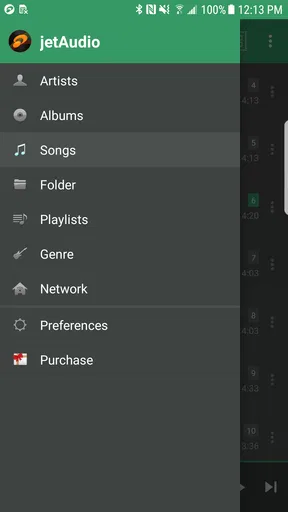
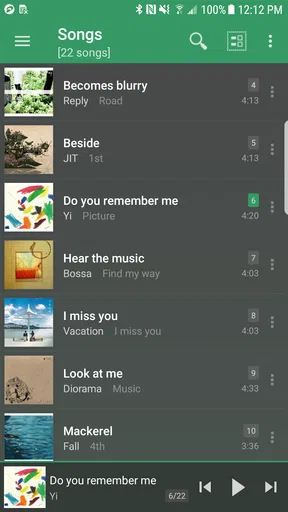
One of my favorite aspects of jetAudio+ is its user-friendly playlist management. Creating and organizing playlists is a cinch, and you can even import playlists from other music apps. This makes transitioning to jetAudio+ super smooth if you're switching from another player.
Why You Might Love It
Now, let’s talk about why you might fall in love with this app. For one, if you’re someone who enjoys tweaking settings and personalizing your audio experience, jetAudio+ is like a playground. The level of control it offers is impressive, and it's rare to find such comprehensive features in a mobile app.
Moreover, the high-res support is a game-changer if you have a collection of high-quality audio files. You’ll truly appreciate the difference in sound quality, especially if you're using good headphones or speakers.
Final Thoughts
So, is the jetAudio+ Hi-Res Music Player worth a download? If you ask me, it’s a resounding yes. It's packed with features that cater to both casual listeners and serious audiophiles. Whether you’re on a commute, working out, or just chilling at home, jetAudio+ provides a rich and customizable listening experience.
Give it a try, and you might find yourself wondering how you ever lived without it. Happy listening!
Verdict
Strengths of jetAudio+ Hi-Res Music Player
- High-quality audio playback
- User-friendly interface
- Extensive format support
- Customizable equalizer settings
- Offline playback available
Limitations of jetAudio+ Hi-Res Music Player
- Ads can be intrusive
- Limited features in free version
- Occasional app crashes
- Not all features intuitive
- Can be resource-intensive
Similar Picks in This Category
View All
YouTube Music
Google LLC4.4

Samsung Music
Samsung Electronics Co., Ltd.3.8

Spotify: Music and Podcasts
Spotify AB4.3

JioSaavn - Music & Podcasts
Saavn Media Limited4.3

Lark Player:Music Player & MP3
Lark Player Studio - Music, MP3 & Video Player4.6

StarMaker: Sing Karaoke Songs
SKYWORK AI PTE. LTD.4.3
Frequently Asked Questions
What features does jetAudio+ Hi-Res Music Player offer?
jetAudio+ Hi-Res Music Player provides a comprehensive suite of features for music enthusiasts, including high-resolution audio playback, a 20-band equalizer, and various audio effects. It supports multiple file formats such as MP3, FLAC, and WAV. Additionally, it offers customizable themes and widgets for a personalized experience.
Is jetAudio+ compatible with all audio file formats?
jetAudio+ supports a wide range of audio file formats, including popular ones like MP3, FLAC, WAV, and more. This extensive compatibility ensures that users can play most of their music library without needing to convert files, making it a versatile choice for audiophiles.
Does jetAudio+ require an internet connection to function?
While jetAudio+ does not require an internet connection for playing stored music files, certain features, like streaming online radio stations or accessing cloud storage, will need internet access. Users can enjoy offline playback with their locally stored music, ensuring uninterrupted listening.
Are there customization options available in jetAudio+?
Yes, jetAudio+ offers extensive customization options. Users can adjust the sound using a 20-band equalizer, apply various audio effects, and personalize the interface with different themes and widgets. These features allow users to tailor the app to their audio preferences and aesthetic tastes.
What are the benefits of upgrading to the paid version of jetAudio+?
Upgrading to the paid version of jetAudio+ unlocks additional features such as enhanced audio effects, advanced equalizer controls, and an ad-free experience. This version also includes unique widgets and themes, providing a more comprehensive and enjoyable user experience for serious music listeners.
